
If you build software in Mendix, you’ve probably seen colleagues working in Java, TypeScript, or Python use AI tools like GitHub Copilot, Cursor, or Claude. In those text-based stacks, you can point an AI assistant at a file, ask it to write a unit test, and get a sensible test script in seconds.
Try doing that in a Mendix project, though, and you quickly hit a wall.
The reason is pretty straightforward: “Mendix applications aren’t folders full of text files.”
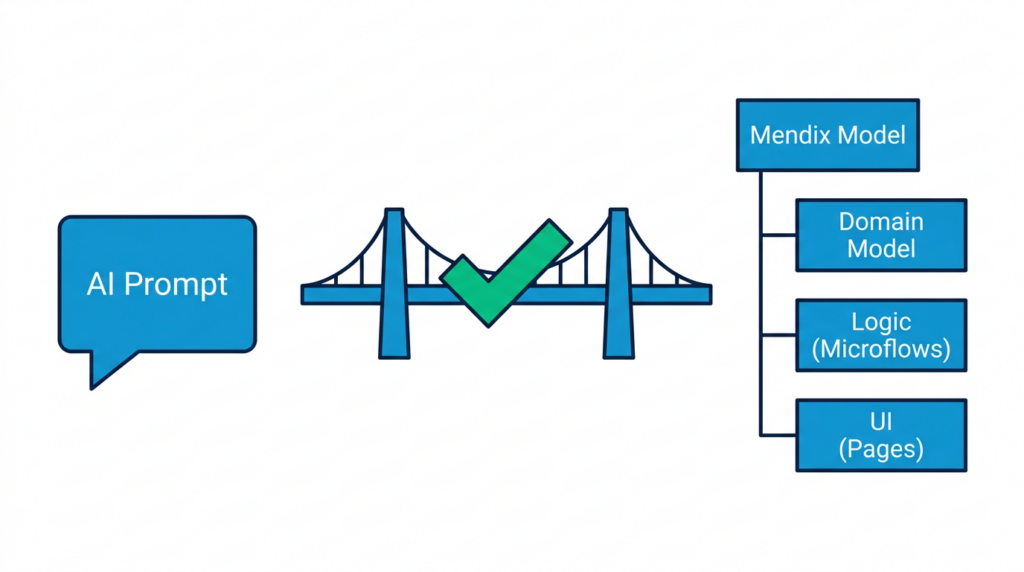
Your microflows, domain entities, associations, security rules, and pages live inside a single `.mpr` project file. Because standard AI tools only know how to read text files, they can’t see what’s going on inside your Mendix model. If you ask an off-the-shelf AI to “test my calculate discount microflow,” it usually makes up random Java code or guesses what your parameters might be.
When we build tests, having clear user stories, acceptance criteria, or OpenAPI specs is always helpful. You can feed those directly into your AI prompt so the assistant understands what the business wanted to build.
But let’s be realistic: in many enterprise projects (especially apps built in Mendix 9 or 10 that have been running in production for years), documentation is often incomplete or outdated. The original stories in Jira rarely match what the app does today.
This is where Mendix developers actually have an advantage over traditional coders. In Mendix, the visual model “is” the implementation:
If we give an AI assistant a safe way to read that model, it doesn’t need to guess your application logic. It can see the exact paths, parameters, and return types directly from the source.
For teams already familiar with Menditect Test Automation (MTA), the execution engine has always been solid. It runs microflows directly, supports frontend UI tests, and automatically rolls back database changes so your test data doesn’t clutter your environments.
The pain point was never the test runner; “it was the time it took to build tests by hand.”
In MTA 3.1 and earlier, setting up a test meant doing everything manually in the web interface: creating a suite, adding test steps, selecting entity types, and typing in parameter bindings and assertion rules one by one.
If you had a couple of microflows to test, that was manageable. But if you were maintaining a large Mendix 9 or 10 app with dozens of business-critical flows, manually scripting tests felt like a full-time job. Most teams simply didn’t have the hours to spare, so test debt piled up, making refactoring or upgrading to Mendix 10 feel risky.
With MTA 3.2, that manual hurdle goes away:
We didn’t build another separate AI chat tool. Instead, we use the open Model Context Protocol (MCP) so you can connect your existing AI assistant (Cursor, Claude Code, Gemini Antigravity, or Copilot) directly to your project:
To make setting this up easy, Menditect publishes an open source template for workspace configuration with MTA MCP, MTA plugin MCP, and `mxcli` or Studio Pro MCP in the repository Menditect/agentic-test-tools.
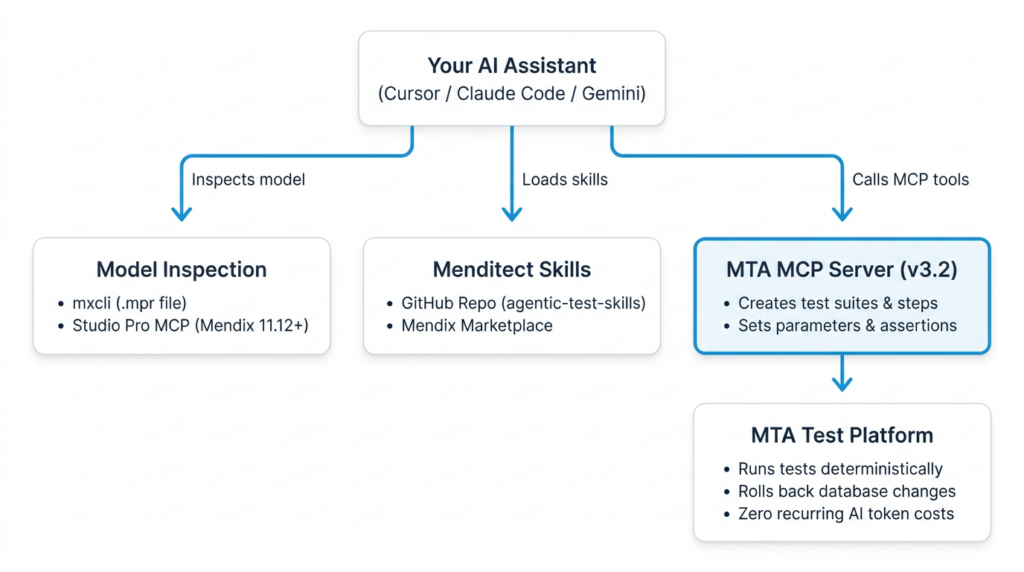
Once the test is generated, it lives in MTA. You can run it locally or trigger it in your CI/CD pipeline whenever someone commits to Team Server, with no ongoing AI token costs.
MTA 3.2 is coming out in a few weeks. If you want to see how it works on real Mendix microflows, check out these sessions:

| info@menditect.com | |
| +3185 - 4010494 | |
| KvK: 82975795 | |
| Follow us on LinkedIn |
Enter your information and choose a day and time when you would like to meet Menditect sales (1,5 hrs).